SCION HTTP Reverse Proxy
The SCION HTTP Reverse Proxy makes HTTP(S) resources available via SCION by configuring a reverse proxy in front of them. It is implemented as a Caddy plugin, and can be used with any compatible Caddy server version.
If you are looking for the forward proxy, see Forward Proxy.
Overview
The Caddy plugin currently supports two types of network listeners:
HTTP1.1/HTTP2.0 over SCION: The plugin can listen for incoming HTTP1.1/HTTP2.0 requests over a single-stream SCION connection.
This enables SCION resources to be accessed by the Forward Proxy. More concretely, if you intend to make your resources available for the current SCION Browser Extension you can use this mode.
HTTP3 over SCION: The plugin supports a native HTTP3 listener over SCION to serve resources to clients that support HTTP3. Note that HTTP3 is not supported by the SCION Browser Extension.
Prerequisites
A
SCION-enabled hostin aSCION-enabled network(see Access and Host Configuration).
Download for your target platform
You can download the SCION HTTP Reverse Proxy pre-built binaries in releases. Otherwise, you can build the plugin for your target platform as described below.
Build for your target platform
You can build the caddy server containing the SCION plugin from source as follows:
Download the source code from the Caddy SCION repository.
Build the plugin by running the following command in the root directory of the repository. Depending on what protocol the reverse proxy should support, you can build the binary with the following commands:
Native HTTP3 support:
CGO_ENABLED=0 GOOS=linux GOARCH=amd64 go build -o ./build/scion-caddy-native ./cmd/scion-caddy-native
HTTP1.1, HTTP2.0 and native HTTP3 over SCION:
CGO_ENABLED=0 GOOS=linux GOARCH=amd64 go build go build -o ./build/scion-caddy-reverse ./cmd/scion-caddy-reverse
Adapt the
GOOSandGOARCHvariables to your target platform, e.g.,GOOS=windows GOARCH=amd64for Windows.
Installation for Linux
Then, you can follow the steps below to install the plugin:
Copy the binary to
/usr/local/binor any other directory in your$PATH.Add network capabilities to the binary:
sudo setcap cap_net_bind_service=+ep /usr/local/bin/scion-caddy
Optionally, you can create a systemd service and enable it. You can use the example service file
scion-caddy.servicein the examples.The reverse proxy can work in two modes, layer-5 or layer-4 (passthrough). Check the corresponding sections to configure the reverse proxy accordingly.
Installation for Windows
Then, follow the steps below:
Ensure that you are running the scion-endhost stack as described in the SCION documentation.
The reverse proxy can work in two modes, layer-5 or layer-4 (passthrough). Check the corresponding sections to configure the reverse proxy accordingly.
Run the binary with the configuration file:
.\\scion-caddy run -conf \\path\\to\\your\\config.json
Warning
The SCION endhost stack is not officially supported on Windows, but it can be built and run with some limitations. Mainly, the dispatcher is not supported on Windows, but you can run SCION applications in environments that do not require the dispatcher. This is applicable if your network provider runs SCION version >= 0.12.0, available from the Releases.
Configuration
The SCION HTTP Reverse Proxy is configured via the Caddy JSON config. The location of the JSON config is specified in the systemd service file or when running the binary via the -conf flag.
One can enable two modes of operation: layer-5 reverse proxy and layer-4 reverse proxy (passthrough) by configuring the Caddy JSON file accordingly.
ISD-AS environment
The SCION HTTP Reverse Proxy can be configured to serve resources for different ISD-ASes. Those are configured in the /etc/scion/environment.json file.
You can specify a different location by setting the SCION_ENV_PATH environment variable. The file format is as follows:
{
  "ases": {
    "<ISD-AS>": {
      "daemon_address": "<IP>:<Port>"
    },
    "<ISD-AS>": {
      "daemon_address": "<IP>:<Port>"
    }
  }
}
Layer-5 Reverse Proxy
The SCION HTTP Reverse Proxy can act as a layer-5 reverse proxy, terminating the TLS connection and forwarding the request to the backend server. In this case, the reverse proxy must provide the expected certificate for the specified domain. Afterwards, it will forward the HTTP request to the backend server.
The plugin configuration for Caddy is extended with:
scion modulehttps://caddyserver.com/docs/modules/scionSCION network listener configuration, which is used to specify the SCION address and port to listen on, we extend with the following network names:
scion: The SCION network listener for native HTTP3 over SCION.scion+single-stream: The SCION network listener for HTTP1.1/HTTP2.0 over SCION.
The address follows the network address convention for Caddy, e.g., scion/[1-ff00:0:112,127.0.0.1]:8443 or scion+single-stream/[1-ff00:0:112,127.0.0.1]:7443.
You can follow the example in examples to configure the reverse proxy to serve specific domains in this mode. For more information on how to configure Caddy, see the Caddy documentation.
It is important to configure the HTTP protocols consistently using the listen_protocols option in the Caddy JSON config.
The possible combinations are (one can configure one or several out of the following protocols for each listener):
[h3]for thescionlistener.[h1, h2]for thescion+single-streamlistener.[h1, h2, h3]for regular HTTP listeners.
Layer-4 Reverse Proxy (Passthrough)
If TLS termination option is not desirable due to the setup, the SCION HTTP Reverse Proxy can act as a layer-4 reverse proxy, forwarding the TCP connection to the backend server. In this case, the reverse proxy will not terminate the TLS connection, but will forward the TCP connection to the backend server.
This feature is enabled via the non-standard layer-4 module (see Caddy layer-4 documentation).
The plugin configuration for Caddy is extended with:
SCION network listener configuration, which is used to specify the SCION address and port to listen on, we extend with the following network names:
scion+single-stream: The SCION network listener for single-stream connection over SCION.
You can follow the example in the examples to configure the reverse proxy to serve specific domains in this mode. For more information on how to configure Caddy, see the Caddy layer-4 documentation.
Note
Layer-4 reverse proxy for HTTP3 clients has not been tested yet.
One may try to use the “scion” network listener with the layer-4 module to achieve this, especially in combination with layer4.matchers.quic.
For more information, you can check Caddy layer-4 github repo.
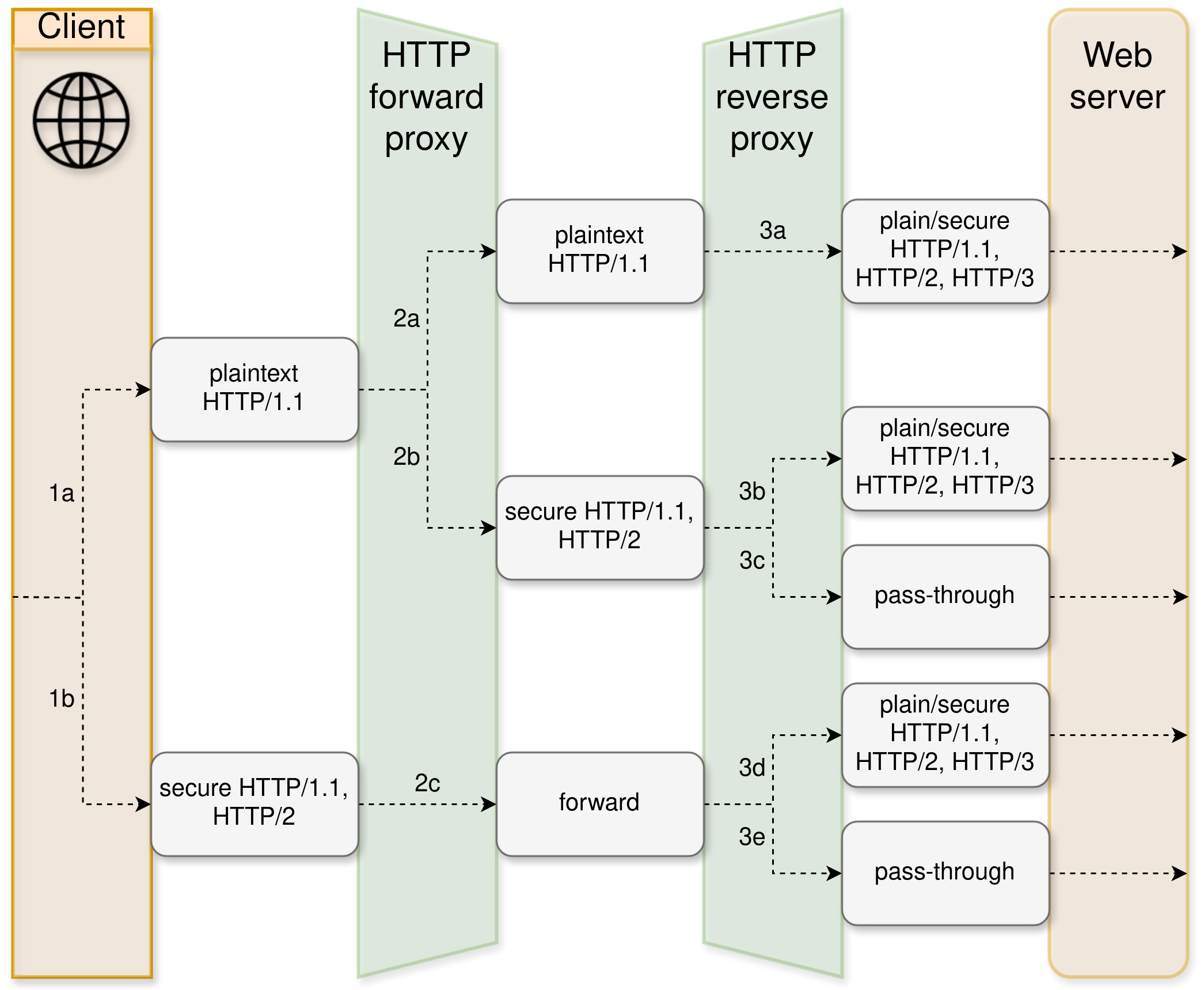
Forward Proxy and Reverse Proxy ecosystem
The SCION HTTP Reverse Proxy can be used in combination with the SCION Forward Proxy to provide a SCION browsing experience. The figure below shows the enabled ecosystem.